Scaling external workloads with KEDA and a Kubernetes controller
- 6 min read
- Go
- Kubernetes
- KEDA
- Autoscaling
- Controllers
How a small Kubernetes controller lets KEDA scale capacity outside the cluster

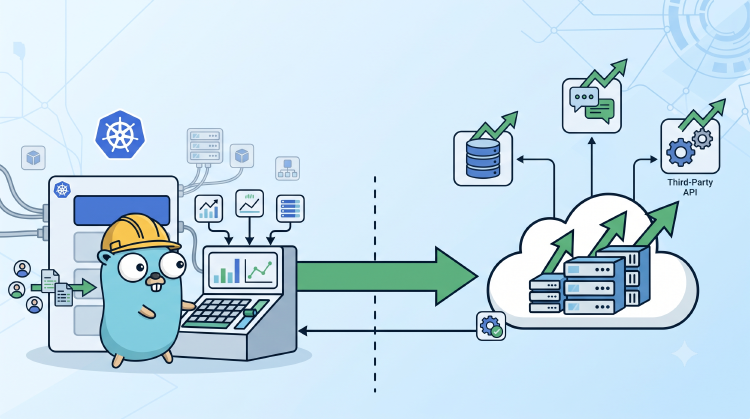
Kubernetes is pretty good at scaling Kubernetes things. Give it a Deployment, a metric, and a Horizontal Pod Autoscaler (HPA), and it knows exactly what to do. But what happens when the capacity we need to scale lives somewhere else? Maybe it is a managed data store, a queue consumer fleet, a hosted service, or just a platform with a perfectly reasonable Hypertext Transfer Protocol (HTTP) application programming interface (API) but no Kubernetes Pods for us to manage.
That is the awkward bit. We still want the familiar feedback loop: traffic goes up, a metric crosses a threshold, capacity goes up; traffic cools down, capacity follows. We just need the last hop to leave the cluster.
We solved that with a deliberately small adapter. Kubernetes Event-driven
Autoscaling (KEDA) and HPA continue doing what
they are good at: reading metrics and deciding the desired capacity. A custom
Kubernetes controller applies that desired number to an external API and reports
the externally observed capacity in status.replicas. That observed value is
part of the scale target response HPA uses for its next recommendation. No custom
metric loop, no reimplementation of HPA maths, and no pretending that an
external service is a Deployment.
The Idea: Let HPA Scale a Custom Resource
The useful Kubernetes feature here is the scale subresource. A Custom Resource Definition (CRD) can expose three paths that make it look scaleable to HPA:
subresources:
  scale:
    specReplicasPath: .spec.replicas
    statusReplicasPath: .status.replicas
    labelSelectorPath: .status.selector
Once that exists, KEDA can point a ScaledObject at our
Custom Resource (CR).
KEDA creates an HPA, and the HPA writes its recommendation to spec.replicas
through /scale, just as it would for a Deployment.
Our controller watches the resource, sees the requested capacity, and calls the external API. The resource becomes a clean hand-off point between Kubernetes' autoscaling control plane and a system that Kubernetes does not host.
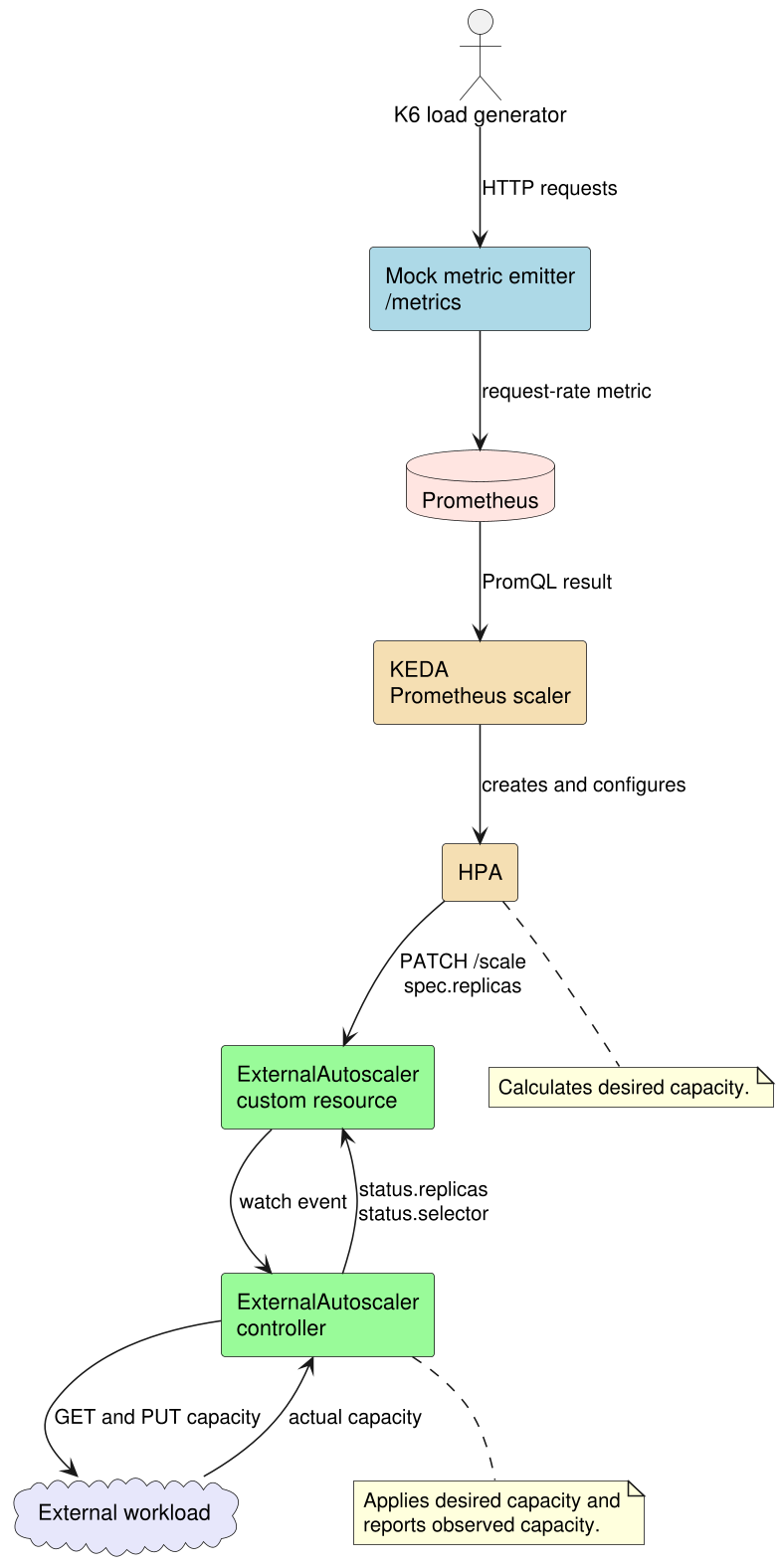
The important part is that there is still only one decision maker. KEDA and HPA
calculate what the desired capacity should be. The controller applies that
capacity externally, then reports the actual external capacity back through
status.replicas so HPA has an accurate current value for its next calculation.
A Tiny Resource Contract
Our example CRD is named ExternalAutoscaler. It is intentionally boring:
apiVersion: autoscaling.demo.example.com/v1alpha1
kind: ExternalAutoscaler
metadata:
  name: demo-capacity
spec:
  target:
    endpoint: http://mock-external-workload:8080
status:
  replicas: 1
The bits that matter have different owners:
spec.targetis normal configuration: the external target endpoint belongs to the user or GitOps.spec.replicasis desired capacity. After setup, it belongs to HPA.status.replicasis the capacity the controller actually observed at the external target.status.selectoris published by the controller for HPA validation.
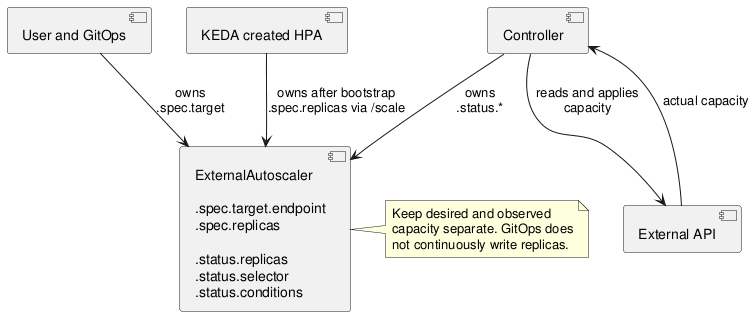
That ownership split is not paperwork. If GitOps continuously writes
spec.replicas, it will fight the HPA. You get capacity flapping and a very
confusing afternoon. The controller should not own it either, except for the one
bootstrap step described next.
The Bootstrap Catch
There is a small chicken-and-egg problem with an empty resource. We want GitOps
to omit spec.replicas, so it does not later overwrite HPA’s value. But KEDA
needs the scale target’s desired-replica path to exist before it can create the
HPA.
The controller breaks that deadlock once. It reads the current external capacity
and initializes spec.replicas to that value. That does not change the external
system; it merely gives HPA a place to write. From then on, the controller only
reads spec.replicas and updates status.
For a deeper look at why GitOps should omit an HPA-owned spec.replicas field,
including the conflict that otherwise occurs during reconciliation, see
HPA and Flux replicas conflict.
In simplified Go, the reconciliation flow looks like this:
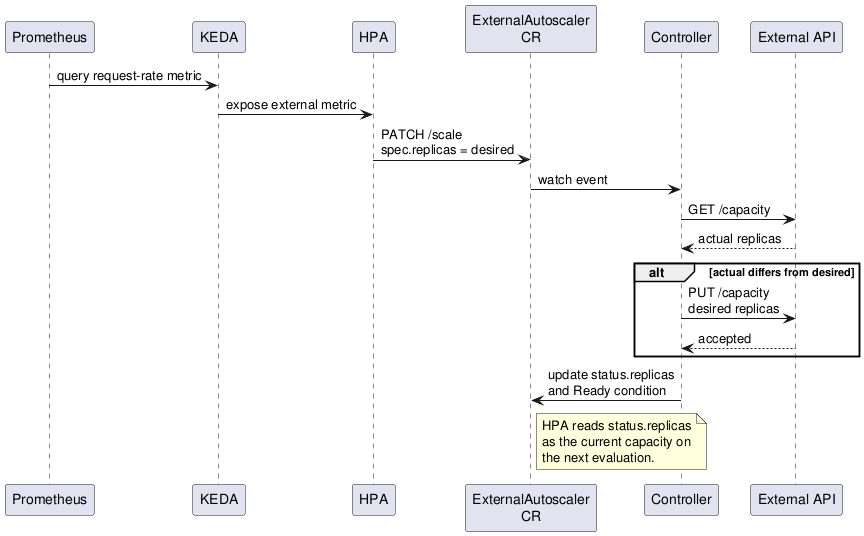
actual := target.GetCapacity(ctx)

if autoscaler.Spec.Replicas == nil {
    autoscaler.Spec.Replicas = &actual
    client.Update(ctx, autoscaler)
    return
}

if actual != *autoscaler.Spec.Replicas {
    target.SetCapacity(ctx, *autoscaler.Spec.Replicas)
}

autoscaler.Status.Replicas = *autoscaler.Spec.Replicas
client.Status().Update(ctx, autoscaler)
There are production details to add around this, obviously: authentication, timeouts, retries, idempotency, external-service limits, and a sensible failure mode. But the pattern itself stays small.
The Slightly Weird Selector Requirement
One detail caught us off guard. HPA expects the scale target to report a selector, even though our target is not a set of Kubernetes Pods. Without one, the HPA may report selector or ready-Pod validation failures instead of scaling.
The solution is to expose a selector for the controller’s own ready Pods:
status:
  selector: app.kubernetes.io/name=external-autoscaler-controller
That selector is an HPA validation anchor. It is not a representation of the
external workload and must not be used as its capacity. The external capacity
remains status.replicas, read from the target API.
Let’s Make It Real in Kind
Talking about control loops is great, but watching one move is much better. We put together a small public reproducer at keda external autoscaler demo.
The demo gives us four moving pieces:
- A mock external workload with
GETandPUT /capacityendpoints. Its capacity is not Kubernetes replica count; it is just state behind an HTTP API. «««< HEAD - A mock metric emitter that receives K6 traffic and exposes a Prometheus request counter. It does not forward traffic to, or otherwise represent, the external workload.
- KEDA with a Prometheus trigger that turns metric-emitter request rate into an HPA recommendation.
- The
ExternalAutoscalercontroller that sends each new desired capacity to the mock workload.
The separation is intentional. The metric emitter is only a controllable source of demand for the demo. The external workload is only the target whose capacity the controller reads and updates. In a real integration, those may be completely different systems too: an application metric can drive capacity in a managed service without requests ever passing through that service’s control API.
Grafana and Prometheus are installed in the Kubernetes in Docker (Kind) cluster too, so we can see all three useful signals at once: incoming request rate, HPA desired replicas, and external capacity.
Running it is intentionally short:
git clone https://github.com/rbroggi/keda-external-autoscaler-demo
cd keda-external-autoscaler-demo
./scripts/up.sh
./scripts/traffic.sh
Then, in another terminal:
kubectl -n external-autoscaler-demo get externalautoscaler demo-capacity -w
kubectl -n external-autoscaler-demo get scaledobject,hpa -w
./scripts/grafana.sh
Here is the complete loop in action: the K6 traffic profile increases request rate, KEDA and HPA update desired capacity, and the controller reconciles the external workload before the lower-traffic phase brings it back down.
The demo is intentionally reactive. Its short polling interval and simple request-rate threshold make the loop easy to observe. This is not a recommended production policy; it is a way to see the hand-off from traffic to metric to HPA to external API with minimal moving parts.
You can also inspect exactly what HPA sees:
kubectl -n external-autoscaler-demo get --raw \
  /apis/autoscaling.demo.example.com/v1alpha1/namespaces/external-autoscaler-demo/externalautoscalers/demo-capacity/scale
That response contains the HPA-controlled desired replicas, the controller-observed actual replicas, and the selector needed for HPA validation.
Where This Fits, And Where It Does Not
This approach is useful when Kubernetes can observe demand but the thing that supplies capacity has its own API. It keeps scaling policy in the Kubernetes tools that already know how to evaluate metrics, stabilize recommendations, and expose useful status.
It is not a magic abstraction over every external system. An external resize may be asynchronous, slow, bounded by provider limits, or unable to scale down safely. Those are target-specific concerns for the controller to model. For a production integration, we would also add credentials through Secrets, request deadlines, retry rules that respect the target’s API semantics, conditions that expose progress and failures, and conservative operational limits.
But for the core problem, the pattern is pleasantly direct: KEDA decides the number, HPA stores it in a standard scale target, and a controller applies it where the capacity actually lives.